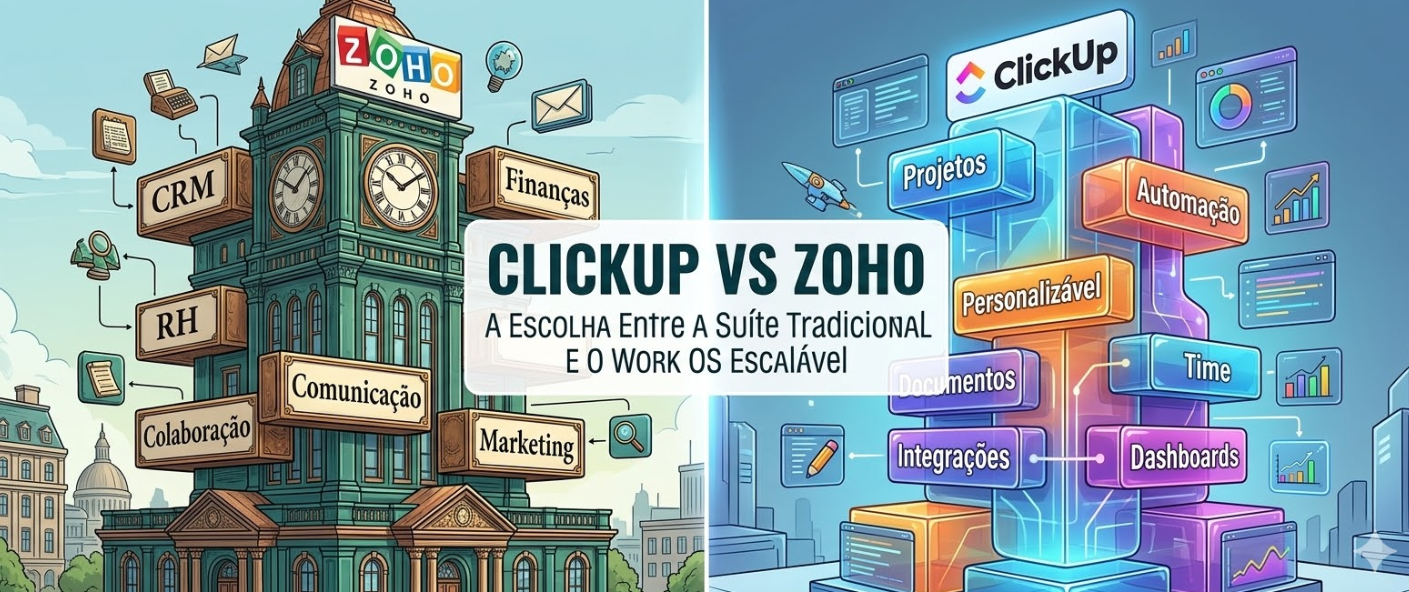
Zoho and ClickUp represent two distinct philosophies about how work should be managed.
Zoho is a traditional integrated suite—similar to Microsoft Office but for business operations. ClickUp is a modern work operating system designed around the idea that the platform should adapt to your workflow.
This article will help you understand which philosophy aligns with your organization’s needs.
Understanding Both Platforms
Zoho: The Traditional Suite
Zoho is a comprehensive suite of applications. Just like Microsoft Office has Word, Excel, and PowerPoint, Zoho has Zoho CRM, Zoho Projects, Zoho Books, Zoho People, and so on.
The advantage of this approach is consistency—everything looks and feels similar. The disadvantage is that each component is a jack-of-all-trades, master-of-none.
ClickUp: The Modern Work OS
ClickUp is laser-focused on work management. But instead of trying to do everything (like Zoho), ClickUp does work management exceptionally well and integrates with every other tool you might need.
Core Functionality Comparison
Project Management
Zoho Projects:
– Traditional project management features
– Gantt charts, kanban boards, list views
– Time tracking
– Resource planning
– Basic automation
– Adequate but not exceptional
ClickUp:
– Multiple view options (15+ different views)
– Native automation and workflow builder
– Advanced time tracking
– Resource workload analysis
– Extensive customization
– Exceptional project management
Verdict: ClickUp. Far more capable for project management.
CRM Capabilities
Zoho CRM:
– Comprehensive CRM built into the suite
– Sales pipeline management
– Customer data management
– Lead scoring
– Automation
– A specialized CRM system
ClickUp:
– Limited CRM functionality
– Basic contact management
– Integrates with Salesforce, HubSpot, and other CRMs
– Not a replacement for a dedicated CRM
Verdict: Zoho. If you need CRM, Zoho’s is more complete. But most companies are better served by a specialist CRM (Salesforce, HubSpot) integrated with ClickUp.
Financial Management
Zoho Books:
– Comprehensive accounting software
– Invoicing, expense tracking
– Financial reporting
– Tax compliance
– Integrated into the Zoho suite
ClickUp:
– No native accounting features
– Integrates with accounting tools (QuickBooks, Xero)
– Focuses on operations, not finance
Verdict: Zoho. If you need accounting software, Zoho Books is included. ClickUp delegates this to specialist tools.
HR and Employee Management
Zoho People:
– HR management system
– Employee data, leave management
– Performance tracking
– Recruitment tools
ClickUp:
– No dedicated HR system
– Integrates with HR platforms (BambooHR, Guidepoint, etc.)
Verdict: Zoho. Zoho People is included in the suite.
Integration and Flexibility
Zoho’s Approach
Zoho wants you to use the Zoho ecosystem. While it has integrations with external tools, the philosophy is to use Zoho CRM, Zoho Projects, Zoho Books, etc.
The advantage: consistency and simplicity.
The disadvantage: you’re limited to what Zoho offers in each category.
ClickUp’s Approach
ClickUp is the hub of your work ecosystem. Use ClickUp for work management, and integrate it with your best-of-breed tools in other categories (CRM, accounting, HR, communication).
The advantage: flexibility and specialization.
The disadvantage: you need to integrate multiple tools.
When to Choose Zoho
Choose Zoho if:
– You want an integrated suite where everything works together out of the box
– You need CRM, accounting, and HR in addition to project management
– Your company is building a new operational infrastructure from scratch
– You prefer simplicity and consistency over specialization
– You’re a smaller organization without complex integration needs
– You want everything from one vendor (simpler support and contracts)
Example: A 15-person accounting firm that needs CRM, project management, invoicing, and HR could be well-served by Zoho. One integrated system, one vendor, one bill.
When to Choose ClickUp
Choose ClickUp if:
– You already have specialized tools (CRM, accounting, HR) you’re happy with
– You want a best-of-breed approach rather than an integrated suite
– You need powerful project management and automation
– You expect to integrate with multiple external systems
– You want deep customization and flexibility
– You plan to scale rapidly
Example: A 50-person SaaS company with Salesforce, QuickBooks, and BambooHR would find ClickUp a far better fit than trying to replace all three with Zoho components.
Total Cost of Ownership Analysis
Let’s say you have a 30-person company:
Zoho Approach
– Zoho Projects: $50/month
– Zoho CRM: $25 × 5 users = $125/month
– Zoho Books: $40/month
– Zoho People: $45/month
– Total: $260/month = $3,120/year
ClickUp Approach
– ClickUp Business: $12 × 30 users = $360/month
– Salesforce CRM: $165/month (for 5 users)
– QuickBooks: $30/month
– BambooHR: $100/month
– Total: $655/month = $7,860/year
At first glance, Zoho seems cheaper. But there’s more to consider:
Hidden Costs in the Zoho Approach
1. **Integration overhead:** You still need to integrate Zoho modules with each other. This takes time.
2. **Specialist tool limitations:** Zoho’s CRM is decent, but it’s not Salesforce. If you outgrow it, you’ll migrate anyway.
3. **Lock-in cost:** If you decide Zoho’s CRM isn’t cutting it and you need Salesforce, migrating away is expensive and disruptive.
Hidden Benefits of the ClickUp Approach
1. **Best-of-breed:** You have a world-class CRM (Salesforce), world-class accounting (QuickBooks), etc.
2. **Flexibility:** If a component isn’t working, you can replace it without touching the others.
3. **Specialization:** Each tool is optimized for its domain, not a compromise solution.
4. **Scalability:** As you grow, each component scales independently.
The real comparison: Zoho costs less upfront but costs more when you realize you need specialist tools. ClickUp costs more upfront but gives you the flexibility to scale.
Real-World Example: Growth Trajectory
Year 1: 10 People
Company A chooses Zoho. Everything is integrated. Cost: ~$150/month.
Company B chooses ClickUp + Salesforce + QuickBooks. Cost: ~$500/month.
Result: Zoho wins on cost.
Year 2: 30 People
Company A’s Zoho CRM is hitting limitations. Their sales team wants Salesforce’s advanced features.
Company A has to choose:
1. Keep using Zoho CRM (suboptimal)
2. Implement Salesforce alongside Zoho (managing two systems)
3. Migrate away from Zoho entirely (expensive)
Company B simply adds Salesforce users. Cost increases, but the system remains flexible.
Result: ClickUp’s flexibility starts paying off.
Year 3: 50 People
Company A finally migrates to Salesforce, BambooHR, and QuickBooks. The migration costs $50,000 and 6 months of disruption. They’re now using specialist tools anyway.
Company B has been using specialist tools all along. No migration needed. They’ve had 3 years of optimization.
The Lesson: The cost difference shrinks and even reverses as you scale.
Migration Path: From Zoho to ClickUp
If you’re on Zoho but considering ClickUp:
1. **Assess which Zoho components you actually love:** Is it the CRM, projects, accounting?
2. **Research specialist tools:** Find the best tool in each category (ClickUp for projects, Salesforce for CRM, etc.)
3. **Create a migration plan:** Migrate one component at a time, not all at once.
4. **Run in parallel:** Keep Zoho running while you bring new tools online.
5. **Integrate:** Use APIs and middleware (n8n, Zapier) to make the tools talk to each other.
Audatia’s Recommendation
At Audatia, we’ve implemented both Zoho and ClickUp. Our perspective:
**Zoho is best for:**
– Small, standalone organizations
– Companies with simple, integrated workflows
– Organizations that need everything (project management, CRM, accounting, HR) in one suite
**ClickUp is best for:**
– Growing companies
– Organizations with existing specialized tools
– Companies that value flexibility and best-of-breed solutions
– Teams that need powerful work management and automation
For most scaling companies, ClickUp wins. The flexibility and specialization compound over time, while the cost of being locked into a suite becomes increasingly expensive.
The Bottom Line
Choose Zoho if you want an integrated suite. Choose ClickUp if you want flexibility and specialization.
The best choice depends on your company’s stage:
– **Early stage (under 20 people):** Zoho might be sufficient
– **Growth stage (20+ people):** ClickUp’s flexibility usually wins
– **Enterprise (100+ people):** Definitely ClickUp with specialist tools in each category
Next Steps
1. Audit your current tools and what you use them for
2. Identify pain points with your current system
3. Try both platforms’ free trials
4. Calculate the true cost of ownership over 3 years
5. Choose based on your growth trajectory, not just today’s cost
Ready to choose the right platform for your future? Let’s start the conversation.