When your organization is growing, choosing between an all-in-one platform and a modular solution is one of the most consequential decisions you’ll make.
On one hand, there’s Bitrix24—a comprehensive suite that tries to do everything. On the other, there’s ClickUp—a specialized work operating system designed to integrate with your existing tools.
This article will help you understand which approach aligns better with your company’s needs.
Understanding the Two Approaches
Bitrix24: The All-in-One Corporate Solution
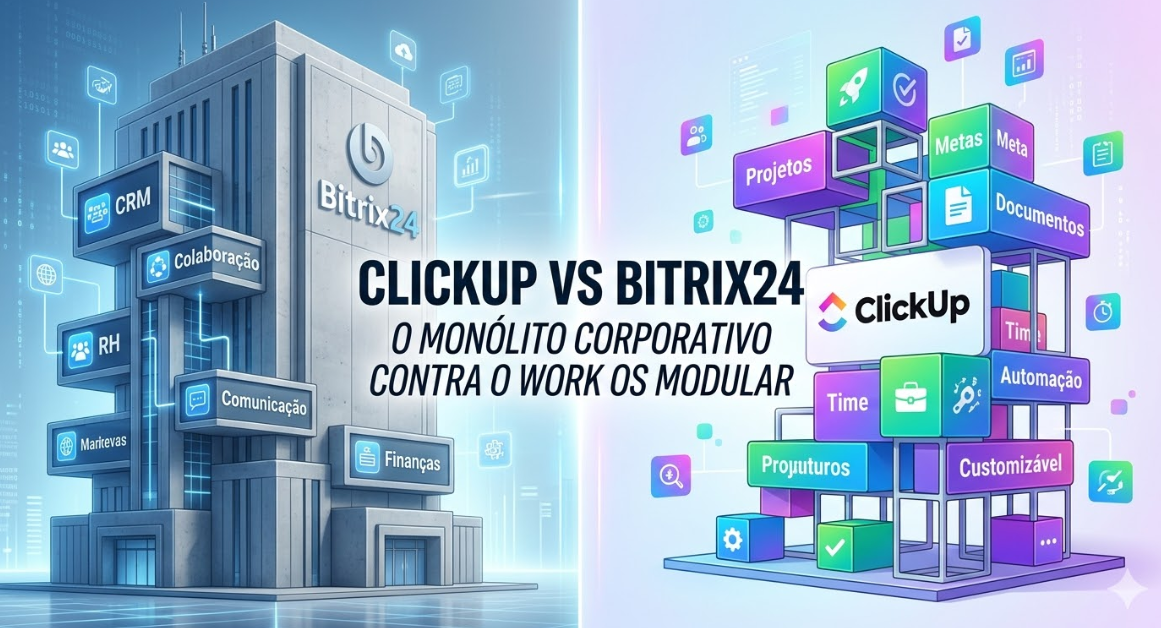
Bitrix24 is a monolithic platform. It includes project management, CRM, HR, document management, and communication—all built into one system. The idea is: you don’t need other tools because Bitrix24 does it all.
ClickUp: The Modular Work Operating System
ClickUp takes a different approach. It’s the central hub for work management and automation, but it’s designed to integrate with your existing tools—your CRM, your HR system, your communication platform.
Comparison: Key Dimensions
1. Scope of Features
Bitrix24:
– Project management
– CRM
– HR and employee management
– Document management
– Communication (chat, video calls)
– Time tracking
– Sales pipeline management
– Customer support ticketing
ClickUp:
– Project management
– Task management
– Automation and workflow builder
– Time tracking
– Document collaboration
– Limited CRM capabilities (add-on available)
Verdict: Bitrix24 has more built-in features. ClickUp is more focused.
2. Integration Philosophy
Bitrix24:
– Designed as a closed ecosystem
– Limited integrations with external tools
– Focuses on having everything within the platform
– If you need a CRM, use Bitrix24’s. If you need an HR system, use Bitrix24’s.
ClickUp:
– Designed to be the hub of your workflow
– Extensive integration ecosystem (Slack, Salesforce, HubSpot, etc.)
– Philosophy: ClickUp integrates with your existing tools
– If you have a CRM, ClickUp connects to it. If you have an HR system, ClickUp talks to it.
Verdict: ClickUp wins if you have existing tools you want to keep. Bitrix24 wins if you want everything in one place.
3. Customization
Bitrix24:
– Some customization available
– Limited compared to specialized tools
– Configuration over customization
– You adapt to the system
ClickUp:
– Extreme customization
– Multiple view options, custom fields, automation rules
– The system adapts to you
– Build workflows specific to your business
Verdict: ClickUp. Significantly more customizable.
4. User Experience
Bitrix24:
– Dense interface with many features
– Steep learning curve
– Overwhelming for new users
– Powerful once mastered
ClickUp:
– Modern, clean interface
– Still has a learning curve but less steep
– More intuitive for new users
– Becomes more powerful as you explore advanced features
Verdict: ClickUp. Better UX, but Bitrix24 works well once you’re in it.
5. Scalability
Bitrix24:
– Scales from small teams to enterprises
– All-in-one means you’re locked in to their solutions
– Hard to swap out one component if it’s not meeting your needs
ClickUp:
– Scales from small teams to enterprises
– Modular approach means you can replace components
– If you need a better CRM, swap out the CRM—ClickUp still works
Verdict: ClickUp. More flexible as your needs evolve.
6. Pricing
Bitrix24:
– Free plan available (limited)
– Basic plan: $39/month
– Standard plan: $99/month
– Professional plan: $199/month
– Pricing is per account, not per user (can be cheaper for large teams)
ClickUp:
– Free plan available
– Unlimited plan: $7 per user per month
– Business plan: $12 per user per month
Verdict: For small teams, Bitrix24 can be cheaper. For large teams, ClickUp is more cost-effective.
When to Choose Bitrix24
Choose Bitrix24 if:
– You’re building a completely new organization with no existing tools
– You want everything in one place, even if individual components are just “good enough”
– Your team is small (under 10 people) and you want simplicity
– You have limited integration needs with external systems
– You want a true “all-in-one” solution
– Your business processes are relatively standard
Example: A new consulting firm with 5 people might choose Bitrix24 and never need to look elsewhere.
When to Choose ClickUp
Choose ClickUp if:
– You already have tools you’re happy with (CRM, HR system, etc.)
– You need best-of-breed tools rather than a “one tool for everything” approach
– You want powerful customization and automation
– Your team is growing and you expect to add tools over time
– Integration with existing systems is important
– You want flexibility to swap components as your needs evolve
Example: A 50-person company with an existing CRM, HR system, and communication platform would find ClickUp’s integration approach far more valuable than Bitrix24’s all-in-one model.
Real-World Scenario: Growing Tech Company
Year 1: 5 People
A startup chooses Bitrix24. Everything works fine. The team uses Bitrix24 for projects, CRM, and communication.
Year 2: 20 People
The company is growing. They realize they want a better CRM and choose Salesforce. But Bitrix24 doesn’t integrate well with Salesforce. They’re stuck.
Now they have to choose:
1. Keep using Bitrix24’s weaker CRM alongside Salesforce (managing two systems)
2. Migrate away from Bitrix24 (expensive and disruptive)
If they had chosen ClickUp from the start:
– ClickUp integrates natively with Salesforce
– As the team grew, they could add Salesforce without any problem
The Lesson
Bitrix24 works beautifully as long as you’re willing to use all of Bitrix24’s components. The moment you want to use a best-of-breed tool in any category, you hit a wall.
The Integration Question
Bitrix24 Integrations
Bitrix24 has integrations, but they’re limited:
– Basic connectors to popular tools
– API is available but not as developer-friendly
– Integration is more of an afterthought
ClickUp Integrations
ClickUp is designed for integration:
– Native integrations with major platforms (Slack, Salesforce, HubSpot, etc.)
– Powerful API
– Webhooks for advanced automations
– Designed to be part of your tool ecosystem
Winner: ClickUp.
Migration: From Bitrix24 to ClickUp
If you’re currently on Bitrix24 but considering ClickUp:
Step 1: Assess Your Current Setup
Identify which Bitrix24 components you’re actually using and which you could replace with better alternatives.
Step 2: Plan Your New Stack
– ClickUp for project and task management
– Salesforce (or other CRM) for sales and customer data
– Your existing HR system for employee data
– Slack for communication
Step 3: Data Migration
Export your Bitrix24 projects and tasks. ClickUp has tools to help with this migration.
Step 4: Parallel Run
Run Bitrix24 and ClickUp in parallel for 2-4 weeks. This allows your team to learn ClickUp while you’re still on the old system.
Step 5: Cutover
Migrate fully to ClickUp. For components Bitrix24 handled that ClickUp doesn’t, move to specialist tools (Salesforce for CRM, etc.).
Audatia’s Perspective
At Audatia, we’ve worked with companies on both platforms. Our observation:
**Bitrix24 is best for:**
– Completely new organizations building from scratch
– Companies with simple, standardized processes
– Organizations not needing specialist tools
**ClickUp is best for:**
– Growing companies with existing tools
– Organizations with complex or unique processes
– Companies that value flexibility and best-of-breed solutions
– Teams that need powerful automation
For most scaling organizations, ClickUp wins because the flexibility and integration capabilities compound as the company grows.
The Bottom Line
The choice between Bitrix24 and ClickUp boils down to this:
– **Bitrix24:** Go all-in on one vendor and hope all components meet your needs
– **ClickUp:** Be the hub of your ecosystem and integrate with the best tools in each category
For fast-growing companies, the flexibility of ClickUp’s approach almost always wins. Once you need a tool better than what Bitrix24 offers, you’re in a difficult position.
Next Steps
1. Evaluate whether you need all the components Bitrix24 offers
2. List the tools you want to integrate with
3. Try both platforms’ free plans
4. Calculate the total cost of ownership (including any tool swaps you might need later)
5. Choose the platform that matches your growth trajectory
Ready to build the right tool ecosystem for your company? Let’s talk.