Original ClickUp Content, translated by Audatia.
Previously, English was the only language with native support in ClickUp. Now, we’re globalizing the entire ClickUp platform to provide you with a native and reliable translation experience, and the time has come for Brazilian Portuguese (beta).
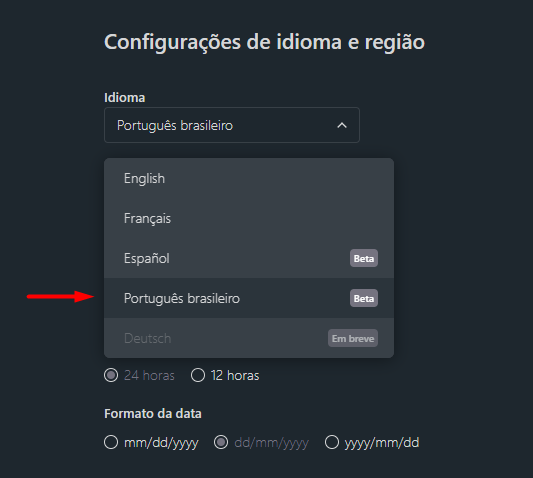
How to Activate Portuguese in ClickUp
Activating Portuguese in your ClickUp workspace is simple:
- Click on your profile picture or avatar in the bottom-left corner
- Select “Settings” from the dropdown menu
- Go to “Preferences”
- Look for the “Language” option
- Select “Português (Brasil)” from the language dropdown
- Click “Save” – the interface will update immediately
What’s Translated in ClickUp Portuguese?
The Portuguese localization includes:
- Full Interface: All buttons, menus, and navigation elements in Portuguese
- Help Documentation: Getting started guides and tutorials translated
- Error Messages: System messages and alerts in Portuguese
- Standard Field Names: Default task fields and workspace elements localized
- Dashboard Labels: Chart titles, metrics, and report labels in Portuguese
Note: Custom fields, task titles, and content you create remain in whatever language you write them in.
Why Language Matters
Offering ClickUp in Portuguese (and other languages) demonstrates ClickUp’s commitment to global users. Benefits include:
- Faster Adoption: Teams learn features more quickly in their native language
- Better Productivity: No mental translation needed – you work more efficiently
- Reduced Errors: Understanding terminology clearly reduces mistakes
- Inclusivity: Non-English speakers feel welcomed and supported
- Team Efficiency: Onboarding new team members becomes faster
Current Beta Status
Portuguese in ClickUp is currently in beta, which means:
- Most of the interface is translated, but you may find occasional English terms
- ClickUp is actively gathering feedback to improve translations
- More features will be localized continuously
- You can switch back to English anytime if needed
Providing Feedback on Portuguese Translations
If you notice any translation issues or confusing terms:
- Note the English term and Portuguese translation
- Describe why the translation might be unclear or inaccurate
- Contact ClickUp support with your feedback through the help menu
- Help ClickUp improve the Portuguese experience for all users
Using ClickUp in Portuguese with Audatia
At Audatia, we’re proud to support ClickUp’s expansion into Portuguese-speaking markets. Whether you’re implementing ClickUp for the first time or optimizing your current setup, we can help in Portuguese.
Our team speaks both Portuguese and English and understands both the platform and your business needs. If you need guidance on ClickUp implementation, training, or optimization, reach out to Audatia – we’re here to help in your language.