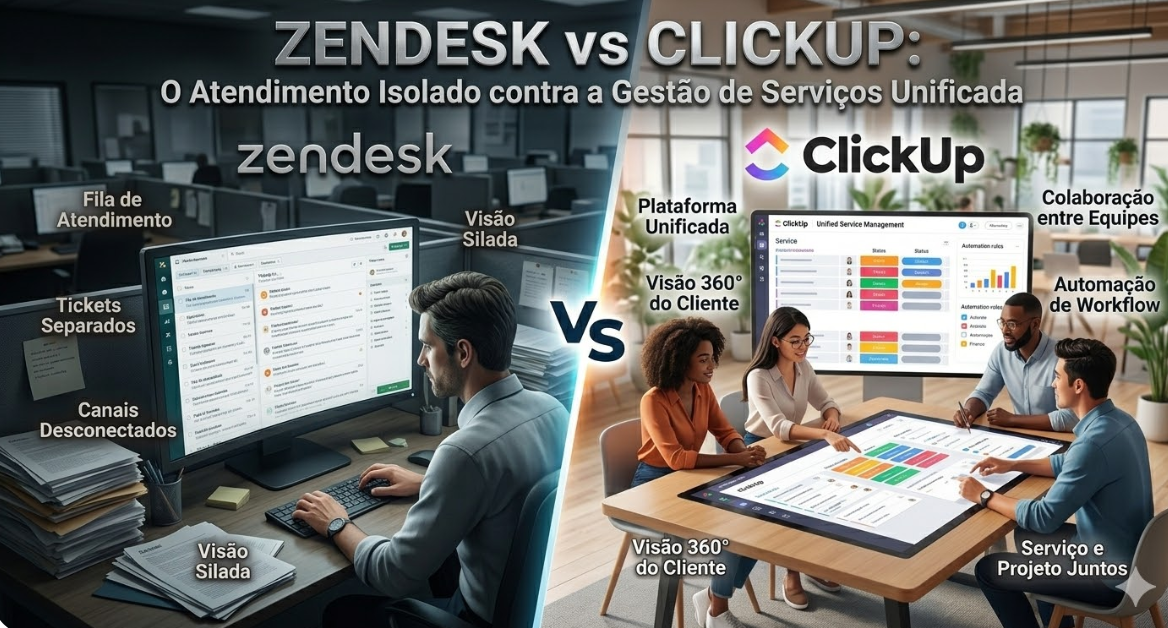
In the growth journey of any organization, the way the company supports its clients and resolves internal problems is the most faithful thermometer of its operational maturity. When the volume of requests exceeds the capacity to manage by email, the need for a professional platform emerges. It is in this scenario that IT leaders and Customer Success (CS) directors face the debate Zendesk vs ClickUp.\r\n\r\nOn one hand, Zendesk is the historical gold standard of Customer Service. A robust tool, built with unwavering focus on ticket resolution and self-service. On the other hand, ClickUp consolidates itself as a modular Work Operating System (Work OS), proposing a paradigm change: transforming support, which is traditionally an isolated silo, into an integrated piece of an ecosystem that connects service to project execution and product development.\r\n\r\nAt Audatia, our experience across dozens of implementations shows that Zendesk is unmatched for pure support management, but ClickUp’s operational integration creates competitive advantage in organizations where support quality depends on coordinating with development and operations teams.\r\n\r\n \r\n\r\n \r\n
Zendesk: The Support Excellence Platform
\r\n
Philosophy and DNA
\r\nZendesk was built with singular obsession: resolve customer support tickets efficiently and effectively. Every feature is optimized for ticket management, agent productivity, and customer satisfaction. It is, without question, the industry standard for customer service management.\r\n
Zendesk’s Strengths
\r\n- Best-in-class ticket management: Zendesk’s interface for managing support tickets is unmatched. Assignment, tracking, resolution—all optimized.\r\n- Customer self-service: Zendesk’s knowledge base and self-service portal are industry-leading. Customers find answers without opening tickets.\r\n- Multi-channel support: Email, chat, phone, social media—all tickets flow into unified queue.\r\n- Advanced routing: Intelligent ticket assignment based on skills, availability, and history.\r\n- Strong reporting: Support metrics (resolution time, satisfaction, agent productivity) are comprehensive.\r\n- Integration ecosystem: Hundreds of native integrations with other business tools.\r\n- Market standard: Zendesk is the expected tool. Customers are often familiar with it.\r\n
Zendesk’s Limitations
\r\n- Siloed from product development: When a ticket reveals a product issue, there’s no native way to create a development task.\r\n- Limited project visibility: Support team doesn’t see development projects. Development team doesn’t see support patterns.\r\n- No automation across departments: Creating a ticket doesn’t trigger actions in product development or operations.\r\n- Focused only on support: Doesn’t help manage operational projects or coordinate with other departments.\r\n
ClickUp: The Unified Work Management Platform
\r\n
Philosophy and DNA
\r\nClickUp doesn’t try to be the best support tool. Instead, it’s designed as a universal Work Operating System where support is one component of a larger ecosystem. The philosophy is that customer support success depends on coordinating with product development, operations, and other teams.\r\n
ClickUp’s Strengths
\r\n- Native project management: ClickUp includes comprehensive project management, so support issues can be linked to development tasks.\r\n- Unified visibility: Support team sees development projects. Development team sees support issues. Product team sees customer feedback.\r\n- Flexible task structures: Support, development, operations—all use the same task management system, enabling natural coordination.\r\n- Powerful automation: Create a support ticket, and it automatically triggers product development tasks, notifies teams, and escalates to management.\r\n- Visual collaboration: All teams (support, development, operations) see the work visually, reducing misalignment.\r\n- Scalable operations: As complexity increases, the platform scales gracefully because it was designed for coordination.\r\n- Unified reporting: Support metrics connect to development velocity and product quality.\r\n
ClickUp’s Limitations
\r\n- Not specialized for support: ClickUp’s support features are less advanced than Zendesk’s ticket management.\r\n- Less support-centric UX: The interface isn’t optimized specifically for support team workflows.\r\n- Learning curve: Teams accustomed to Zendesk find ClickUp’s general interface less intuitive.\r\n- Requires integration with communication tools: You’ll need separate tools (Slack, email) for agent communication.\r\n
The Operational Alignment Question
\r\n
The Zendesk Reality
\r\nIn a Zendesk-centric organization:\r\n1. Support team receives customer issue.\r\n2. Ticket is created in Zendesk.\r\n3. If the issue requires development work, support team opens a separate ticket in the development tool (Jira, ClickUp, etc.).\r\n4. Development team manages it separately.\r\n5. When fixed, development team notifies support team (often via email).\r\n6. Support team closes the ticket.\r\n\r\nThe problem: communication is fragmented; coordination is manual.\r\n
The ClickUp Reality
\r\nIn a ClickUp-centric organization:\r\n1. Support team receives customer issue.\r\n2. Task is created in ClickUp support space.\r\n3. If development work is needed, support team links the task to development project (same system).\r\n4. Development team sees the linked task in their project view.\r\n5. Development team completes the work.\r\n6. Ticket automatically updates in support space.\r\n\r\nThe advantage: communication is integrated; coordination is automatic.\r\n
Practical Scenario: Bug Reports
\r\n
Company Using Zendesk + Separate Development Tool
\r\nCustomer reports a critical bug. Support team creates ticket in Zendesk. Engineer is assigned. Engineer opens Jira ticket in development system. Customer tracks progress in Zendesk ticket. Engineer tracks progress in Jira ticket. Two systems, two sources of truth, potential for misalignment.\r\n
Company Using ClickUp
\r\nCustomer reports a critical bug. Support team creates task in ClickUp. Engineer is automatically assigned (ClickUp handles routing). Both support and engineering see the same task. Customer tracks progress in one place. Misalignment is impossible because there’s only one system.\r\n
Scaling Challenges
\r\n
Zendesk at Scale
\r\nAs your organization grows and support volume increases, coordinating support issues with development becomes more complex. Managing multiple systems (Zendesk + Jira + ClickUp for projects) creates administrative overhead and potential for information loss.\r\n
ClickUp at Scale
\r\nAs support volume increases, the unified system handles it gracefully. Support patterns automatically notify product development. Customer feedback automatically informs product roadmap. Operational transparency increases.\r\n
Pricing Comparison
\r\n
Zendesk Pricing
\r\n- Support Suite: $55-149 per agent per month\r\n- For a support team of 10: ~$600-1,800/month\r\n- Professional services and project management require separate tools\r\n
ClickUp Pricing
\r\n- Free plan available\r\n- Pro: $7 per user per month\r\n- Business: $12 per user per month\r\n- For a support team of 10 + development team of 10: ~$1,400-2,400/month\r\n- Includes support management + project management\r\n
Implementation Path
\r\n
Zendesk Implementation
\r\n- Duration: 4-8 weeks\r\n- Complexity: Medium (configuration and workflow setup)\r\n- Training focus: Support process and ticket management\r\n- Time to productivity: 2-3 weeks\r\n
ClickUp Implementation
\r\n- Duration: 6-10 weeks\r\n- Complexity: Medium-High (requires integrating support, development, and operations)\r\n- Training focus: Unified work management across departments\r\n- Time to productivity: 3-4 weeks\r\n
Who Should Choose Each Platform?
\r\n
Choose Zendesk If:
\r\n- Your primary focus is support excellence and ticket resolution.\r\n- Your development and operations are managed separately with minimal coordination.\r\n- You want the market-leading support platform.\r\n- Budget for support-specific tools is dedicated.\r\n- Your support team is your primary technology investment.\r\n
Choose ClickUp If:
\r\n- You want support, development, and operations in one unified system.\r\n- Customer support patterns inform product development decisions.\r\n- You’re planning significant growth and need operational transparency.\r\n- You want to reduce tool sprawl (fewer platforms to manage).\r\n- Coordination between support and product teams is strategic.\r\n
Final Verdict: Support Excellence vs Operational Integration
\r\nZendesk is the clear leader for pure support management. If support excellence is your competitive advantage and you manage support separately from development, Zendesk is unmatched.\r\n\r\nClickUp is the clear leader for unified work management. If your competitive advantage depends on coordinating support with development and operations, ClickUp is superior.\r\n\r\nAt Audatia, we recommend this approach:\r\n- For support-centric organizations (SaaS with standardized products): Zendesk\r\n- For product-development centric organizations: ClickUp\r\n- For complex organizations that need both excellence in support AND integration with development: Zendesk + ClickUp (with integration via Zapier)\r\n\r\nThe choice depends on your organizational priorities. Choose based on your constraint and your growth trajectory.